
An unfair comment just appeared on your Google Business Profile? It is untrue, defamatory, or posted by someone who was never actually a customer?
You are wondering how to delete a Google review legally, while respecting Google's rules?
👉 You are right to worry about it, here is why:
According to BrightLocal, 98% of consumers read online reviews before choosing a business or service provider, and 87% of consumers use Google to evaluate local businesses.
A single negative review, even a fake one, can be enough to:
- scare off a prospect,
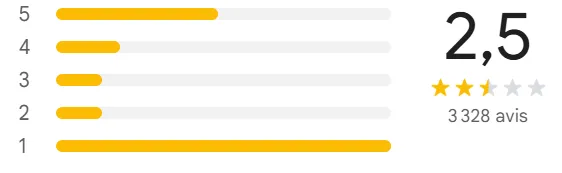
- lower your business's overall rating and directly hurt your online reputation.
There are several simple ways to delete Google reviews: reporting, contacting Google support, or mitigating problematic reviews.
Our client Japan Burger had a fake review taken down within days by reporting it with the exact policy reason Google looks for, rather than arguing with the author in public.
This guide walks you through how to act effectively:
- when Google agrees to remove a comment,
- how to report a Google review that breaks the rules,
- how to respond smartly to negative reviews,
- and above all, how to restore and protect your local reputation.
👉 How Up Review helps you generate more Google reviews in-store with our prize games.
Can you delete a Google review?
The answer is yes, but only under certain conditions!
Google does not give businesses a "Delete" button. However, the Google platform lets you:
- report a review that breaks the rules,
- contact Google support,
- or request the removal of a comment through an official form.
Stay on top of review management on your Google Business Profile. Certain personal details (names, photos, private data) can also be erased on simple request through your Google account.
When does Google agree to remove a review?
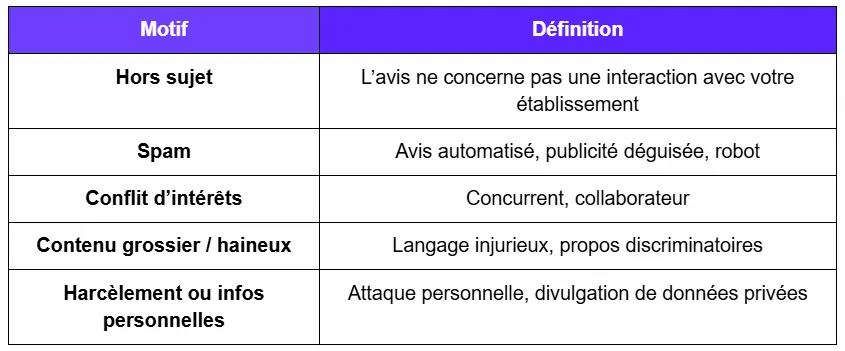
Google's policies spell out exactly when Google agrees to remove a comment:
- Fake review or promotional spam
- Hateful or discriminatory content
- Conflict of interest (competitor, disgruntled former employee)
- Personal information disclosed
- Off-topic content (a comment about a different business)
- Obscene or offensive language
- Illegal or dangerous incitement
👉 See Google's official help policies
If a review falls into one of these categories, you have every right to request its removal... one tip: do not wait!
Real cases: examples of Google reviews that can (or cannot) be removed
Example 1: Potentially removable review

Grounds for requesting removal of a review: insulting language, targeting an employee identified by name, disclosure of personal information.
Likelihood: Medium, Google may take down the review if the comments are judged defamatory.
Example 2: Non-removable review
"I was very disappointed: a 40-minute wait and a dish served lukewarm. I will not be back."
Grounds: subjective opinion based on a genuine experience; no hateful content or personal information.
Likelihood of removal: Low, Google accepts this review as legitimate.
Example 3: Clearly removable review
"Stay away from this place, it is a total scam! The waitresses are idiots, the manager is a thief. I am going to delete your profile myself!"
Grounds: hateful language, personal attack, threatening to delete the listing entirely.
Likelihood: High, matches the criteria for harassment and inappropriate reviews.
How to report an abusive Google review from Google Maps
1. Search for your business name on Google Maps
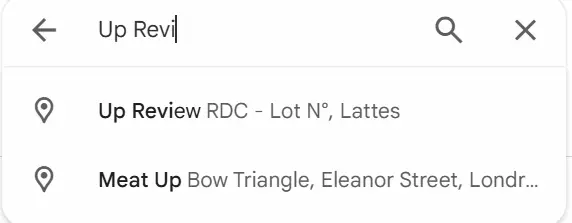
Type your business name into Google Maps to reach your business listing.
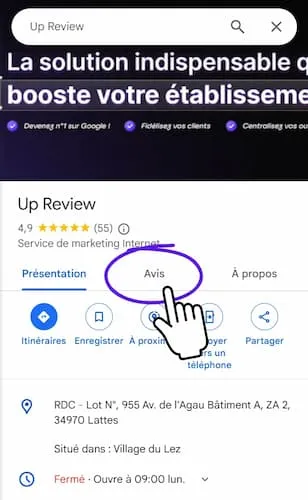
2. Click "Reviews" on your business listing
Open the "Reviews" tab on your Google listing to see every comment left by your customers.
3. Find the review to report
Locate the comment in question in the list of Google reviews attached to your listing.
👉 Double-check that this is really the disputed review before you report it.
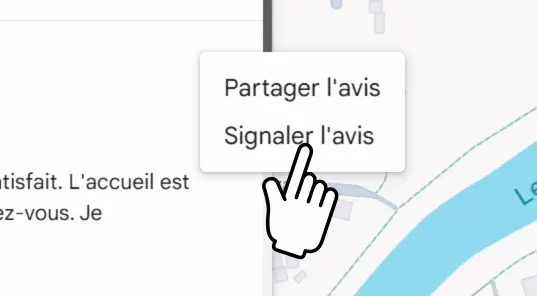
4. Click the three dots, then "Report review"
Click the ⋮ (three dots) icon to the right of the review, then select "Report review" from the drop-down menu.
5. Choose the reason for the report
Select the reason that best matches your situation from the options Google offers:
- Fake review or promotional spam
- Hateful or defamatory content
- Personal information disclosed
- Conflict of interest (competitor, former employee, etc.)
- Off-topic or obscene content
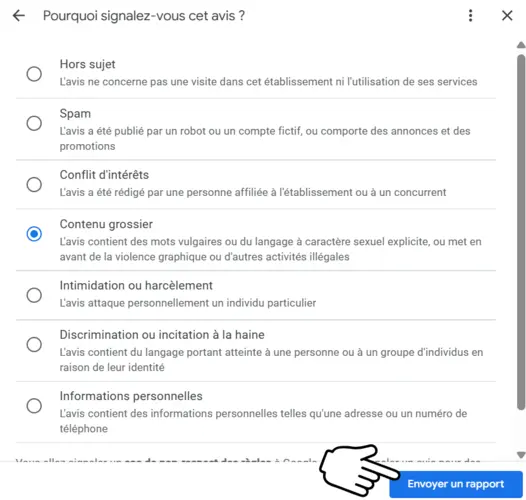
6. Click "Send report." You will get a confirmation receipt.
Click "Send report." You will receive a confirmation receipt acknowledging your request.
Processing time: 2 to 7 business days depending on the moderation workload.
Deleting a Google review from your Google Business Profile
1. Sign in to your Google account
Go to https://myaccount.google.com and sign in with the account linked to your business listing.
2. Open Google Business Profile (via Chrome or another browser)
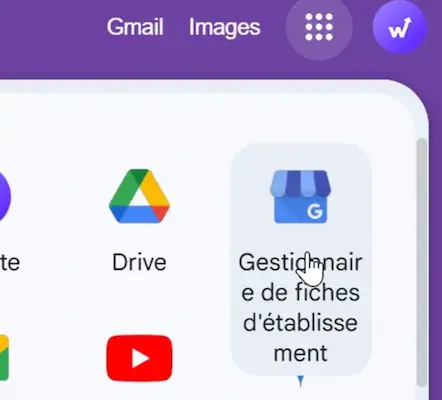
Open Google Business Profile (or Google Business listing) from your browser.
3. Select your listing > "Manage business" or "View profile"
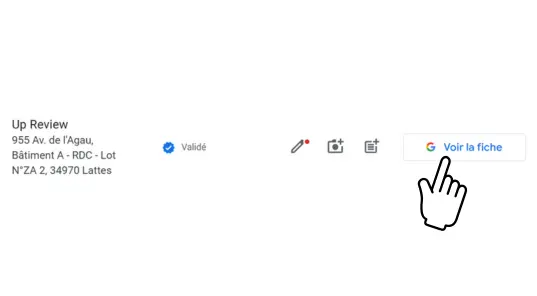
In the dashboard, click your listing, then "Manage business" or "View profile," depending on the interface shown.
4. Go to the "View Reviews" tab
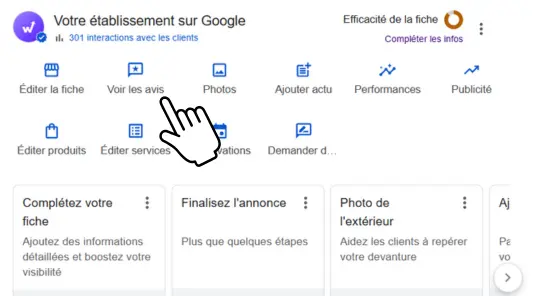
Open the "Reviews" section to see every comment left on your Google Business Profile.
5. Find the review to report
Locate the comment you want removed.
6. Click the warning icon / "Report a review"
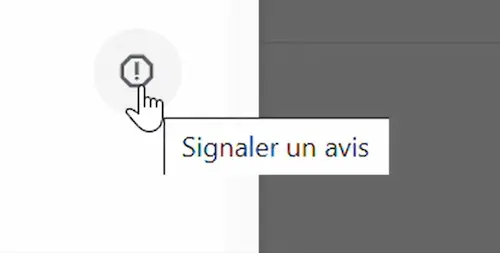
To the right of the review, click the report icon (⚠️) or the "Report a review" menu to open the reporting form.
7. Choose the reason for the report
Select the reason that best matches your situation:
- Inappropriate or offensive content
- Unauthorised personal information
- Fake review or conflict of interest
- Spam or promotional content
8. Click "Send report." You will get a confirmation receipt.
You can also complete the removal from your phone or tablet if you are signed in to your Google account.
Make sure to confirm the removal in the validation message!
How to delete Google reviews in bulk
If you manage several locations or receive a high volume of abusive reviews:
- Go to the Google form for managing multiple business listings
- Select the location in question
- Report inappropriate reviews in bulk
This method is useful if you want to quickly remove all problematic reviews that break Google's rules.
When should you delete a Google review?
If the review is inappropriate, it is essential to act as soon as possible! An inappropriate negative review can put off potential customers and drag down the rating on your Google Business Profile, hurting your reputation.
Report the review quickly through Google Maps or your Google account to limit its impact.
Bonus: Google review calculator: how many reviews to raise your rating?
Want to hit 4.5 stars on your Google listing? Or go from 3.8 to 4.2?
Good news: you can find out exactly how many 5-star reviews you still need to get there!
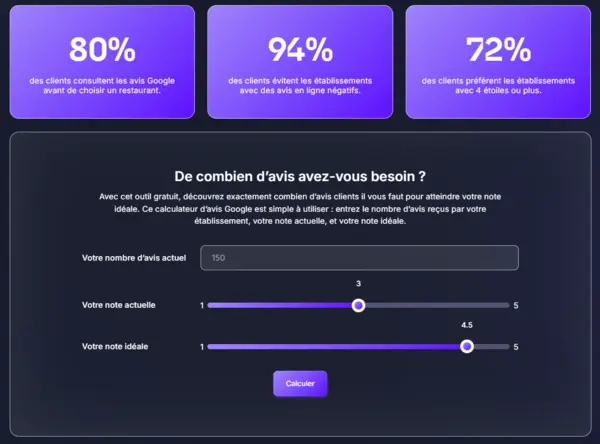
👉 Try our Google review calculator for FREE
What if Google refuses to remove a review?
Reply publicly and calmly lay out the facts
Contact the author of the Google review (via Messenger, email, or a customer record)
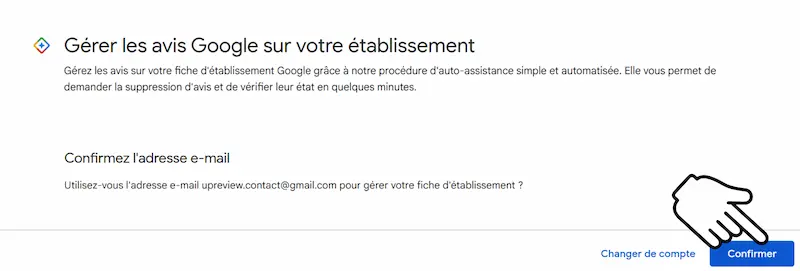
As a last resort, you can ask Google to remove your listing entirely if it is compromised.
Warning: permanently removing the listing also wipes out your positive reviews!
Email template to copy: Appeal after a removal refusal
Subject: Appeal: Request to remove a Google review that violates the guidelines
Hello,
I am writing again regarding a review posted by [Author name or link to the review] visible on our Google Business listing.
This review contains unauthorised personal information and breaks Google's rules.
We are therefore requesting its immediate removal, in line with Google's content policy.
Looking forward to your response,
Best regards,
[Name] [Title] [Business name]
Deleting a Google review: what not to do ❌
- Deleting a review simply because it is negative
- Using fake accounts or bots to report reviews
- Writing threatening or defamatory emails
- Offering discounts to get a review erased
- Trying to deactivate your account to dodge moderation
Under GDPR, you must still respect people's right to free expression and to the protection of their personal data.
Preventing negative reviews: the best strategy
46% of consumers say online reviews are as trustworthy as personal recommendations from friends and family (BrightLocal 2023).
To strengthen your online reputation:
- Turn on automatic customer review collection (form, QR code, email, Messenger).
- Set up an opt-out or removal-request process for data people do not want shared.
- Reply to reviews, even positive ones, to show you are engaged.
Some platforms also help soften the impact of an unfair review by generating automated responses, or by improving your visibility in search engines (through local SEO).
Up Review: the essential tool to generate more positive Google reviews
Deleting an unjustified Google review matters. But growing your positive reviews is what really makes the difference.
👉 According to a study by Harvard Business School, improving a business's average rating by 1 star can increase revenue by 5 to 9%.
And that means collecting customer reviews regularly, credibly, and automatically!
Up Review is a complete solution built for local businesses that want to boost their local visibility and reassure potential customers.
With an all-in-one interface, you can:
- Collect Google reviews through prize games (QR code, flyer, spin-to-win wheel…)
- Reply to reviews automatically with AI
- Centralise all your Google listings in a single dashboard
- Launch SMS marketing campaigns,
- Optimise your local presence on Google Maps and search engines
Result: more authentic customer reviews, a better Google rating, and a stronger brand image.