Still not sure how to respond to a Google review?
Between the lack of time, the fear of getting the wording wrong, or the dread of a negative review or an angry comment... we get it.
Writer's block is very real, especially when it's so important to reply to a Google review!
But a good reply can make all the difference. In 2026, replying to Google reviews is no longer a minor detail: it influences up to 90% of purchase decisions.
- 87% of consumers use Google reviews to evaluate a local business;
- 76% regularly read customer reviews before choosing (BrightLocal, 2023).
👉 In short, replying to Google reviews, whether positive or negative, has become essential for improving your online reputation and optimizing your Google Business Profile.
A well-crafted reply to a review is therefore crucial! Optimizing your visibility in Google search results in 2026 starts with replying effectively to the reviews left online.
Ready to turn your reviews into visibility? Let's get started!
Why replying to Google reviews is crucial
More than 80% of consumers read online reviews before choosing a business or service provider (BrightLocal), and most consumers rely on reviews to form an opinion.
Yet only 54% would consider a business that replies "from time to time" to its reviews, compared with 88% who clearly prefer businesses that give a reply to every single Google review.
👉 A well-written, human reply sends a positive signal about your brand: "We're listening, and your review matters."
And it's not just good for the customer relationship:
- Google rewards review replies in local SEO,
- A review with no reply can put off a potential customer, even a positive one,
- A personalized reply can turn a negative situation around (and save you from losing an unhappy customer!)
Bottom line: every review matters to your future customers. So replying to Google reviews can make all the difference to your business results!
Google review replies: the 5 mistakes to avoid
| Mistake to Avoid | Why It's a Problem | The Right Move |
|---|---|---|
| Replying with no clear goal | A reply that says nothing | Ask yourself what you want to reinforce or fix |
| Forgetting your brand image | Every reply is public | Match the tone to your brand's style and values |
| Replying at random | Inconsistent replies create confusion | Set up a clear reply guideline |
| Not feeding reviews into your strategy | You lose valuable verbatims and objections | Use feedback for email campaigns and content |
| Replying on the surface | A simple "thanks" isn't enough | Craft a reply tailored to each review |
How to reply to reviews: 4 best practices
Replying effectively to Google reviews is not just about "replying to reply." It means reacting to your happy or unhappy customers' comments to strengthen their trust.
Here are 4 simple habits for replying to customer reviews with ease:
1. Reply to reviews quickly
Ideally within 48 hours! It shows you are responsive, attentive and engaged.
Taking too long makes it look like you are not tracking customer feedback... and it can weaken the impact of your reply.
2. Personalize every message
Here is the best way to reply: use the customer's first name and reference a specific detail!
A generic reply comes across poorly.
Be specific, human and direct, so you do not seem indifferent.
3. Stay professional (even facing inappropriate comments)
Stay courteous even when a comment is harshly negative, or even defamatory.
Avoid impulsive replies. Every word you write will be read by your future customers on your Google Business Profile!
4. Offer a concrete solution
Did a customer run into a problem and leave a negative review?
Explain what you plan to do, offer to talk it through, share a contact, or offer compensation if needed. The most important thing: show that you are taking action.
Tip: what if leaving a review became a game?
Create a prize game that boosts your Google reviews. The customer scans a code, leaves a Google review and wins a prize!

👉 Discover how to get more Google reviews with our prize game
How to reply to every type of Google review
| Review Type | Goal of the Reply | Key Moves |
|---|---|---|
| Positive | Strengthen loyalty and encourage recommendations | Thank sincerely, reference a specific detail, invite them back |
| Negative | Reassure other customers and fix the situation | Show empathy, stay calm and factual, offer a private contact or a concrete gesture |
| Neutral | Highlight the positives and address the drawbacks | Show that you're listening, highlight what was appreciated, explain what can improve |
| False / incorrect | Correct it without confrontation and stay credible | Stay factual and polite, offer a contact method, avoid public disputes, flag it to Google if needed |
Replying to reviews online, whether they are positive, negative, neutral, or even fake reviews, is an opportunity: to say thank you, to reassure, or to learn.
Here's how to reply to your customers' reviews:
Replying to a positive review
👉 Goal: strengthen loyalty and encourage recommendations.
A great reply to a positive review or a glowing positive comment:
"Hi [First Name], thank you so much for your review ! We're thrilled you enjoyed [detail they mentioned]. See you again soon!"
- Thank them sincerely (not just a generic "thanks for your review")
- Reference a specific detail they mentioned (the food, the service, the atmosphere...)
- Invite them to come back or share their experience with others
Replying to a negative review
👉 Goal: reassure other customers and fix the situation.
A good reply to a negative review can soften the impact on your business's reputation:
"Hi [First Name], we're sorry to hear about your experience. Your feedback is valuable to us. Please reach out to us at [email], we'd like to make this right."
- Show empathy (even if you disagree)
- Stay calm, courteous and factual
- Offer a private contact channel or a concrete gesture (refund, explanation...)
Replying to a neutral review
👉 Goal: highlight the positives and address the drawbacks.
A "mixed" review deserves just as much attention as any other. It shows the customer is open to dialogue. It is also a chance to take feedback on board:
"Thank you [First Name] for this balanced feedback. We've taken note of your comments and will pass them on to the team. See you soon!"
- Show that you're listening
- Highlight what they liked
- Briefly explain what can be improved
Replying to an incorrect or fake review
👉 Goal: correct it without confrontation and stay credible (avoid any bad press).
A reply to a misattributed complaint needs to stay factual:
"Hi [First Name], we believe there may be a mix-up here: our business doesn't offer this service. Please feel free to contact us directly if you'd like to clarify the situation."
- Be factual and polite
- Offer a contact method (email or phone) to talk it through
- Avoid public disputes: readers will judge your composure and clarity even when the review itself is unfair
40+ ready-to-use reply examples
Replying to Google reviews can quickly eat up your time!
To help you out, we've put together more than 40 review reply examples. So before you reply, you'll have concrete reply templates on hand to manage your customer reviews on Google and respond to criticism effectively. Sorted by review type (positive, negative, neutral or false), and adapted to our clients' industries: restaurants, retail, franchises, hospitality, agencies, and more.
👉 Download the free PDF with all 40 examples right now!
When and how to encourage customers to leave reviews
Don't wait: start asking for reviews now!
A happy customer is far more likely to leave a review if you ask at the right moment. In fact, 65% of consumers say they left a review simply because they were asked to (BrightLocal, 2023).
What works best?
| Channel | Effectiveness | Best For |
|---|---|---|
| Prize-wheel game | 5x more reviews in half the time | In-store, fast collection |
| ≈34% reply rate | Existing customer base, e-commerce | |
| Asking in person | High, if timed right | Direct relationships, end of service |
| Receipt after purchase | Varies depending on the message | Retail with checkout receipts |
By the way... what really matters in 2026 for your local SEO
- An average rating above 4 ★
- Recent reviews, not six months old
- Replying to Google reviews, even the unpleasant ones
- An up-to-date Google Business Profile...
- Exemplary review management
- Positive reviews... as many as possible, obviously!
Google review calculator: how many 5-star reviews do you need to raise your rating?
Want to reach 4.5 stars on your Google profile? Or go from 3.8 to 4.2?
Good news: you can find out exactly how many 5-star reviews you're missing to get there!
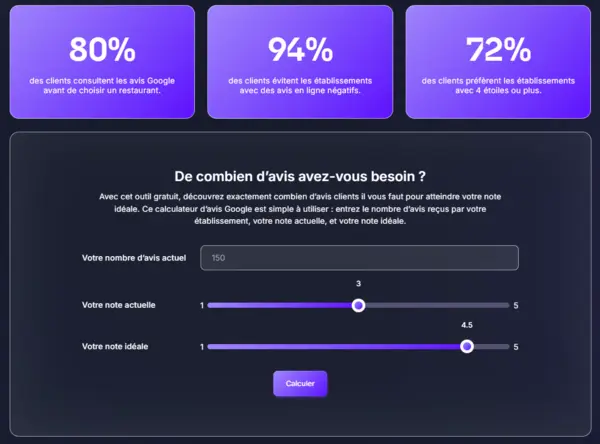
👉 Try our free Google review calculator
Replying to reviews efficiently thanks to Up Review... and so much more!
Crafting the best replies to positive reviews becomes fast and effortless with Up Review! The platform centralizes, automates and personalizes all your reviews.
- Improve your ranking on Google Maps with AI-powered automatic replies.
- Generate QR codes to easily share your menus or your social media pages.
- Build customer loyalty through gamification, by showcasing authentic feedback.
- Launch SMS campaigns and email campaigns to convert and re-engage your customer base.
- Track your results in real time: average Google rating, number of reviews collected, reply rate, and more.
👉 Save time and start replying automatically with Up Review.
Don't leave your published reviews unanswered!