Not sure how to create a Google review link or how to share it with your customers?
👉 Don't worry: we'll walk you through everything, step by step, in under 5 minutes!
Today, many businesses are looking for a simple way to generate and share a Google review link, to collect more customer reviews, strengthen their online reputation and improve their local SEO.
In fact, according to BrightLocal's Local Consumer Review Survey 2026, 97% of consumers check online reviews before choosing a local business.
Our client Polygone Montpellier collected more than 601 Google reviews in just 10 days after we set up a shared review link across the whole team.
In this article, discover:
- How to create a Google review link in 5 simple steps
- 6 effective ways to share it with your customers and maximise your results
Create a Google Review Link from Google Business Profile Step by Step
The most direct and simplest way to create a Google review link is through your Google Business Profile (formerly Google My Business).
It's your Business Profile that lets customers leave reviews visible directly in Google search results or on Google Maps.
The goal here isn't to link to your business listing, but straight to the review-writing page (cutting out a step, so far more conversions and a more direct journey)!
1. Create a Google Review Link on Desktop
(If you're already on your business listing, skip straight to step 4).
Open your browser and go to your Google Business Profile account.
Click "Sign in" in the top right corner to access your account.
- Select the business you want, then click "View profile."
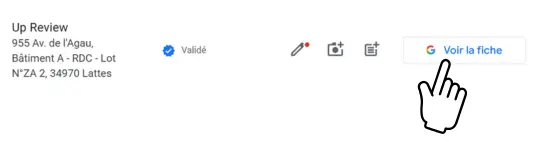
- Once you're on your profile, click "Ask for reviews."
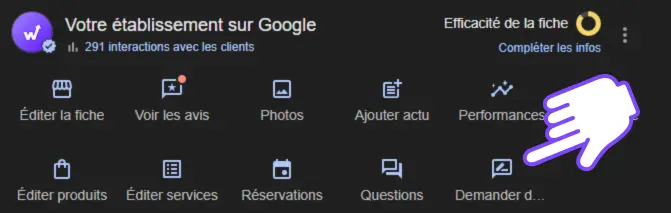
- Then click directly on the link to copy it, or right-click the QR code and select "Save image as..." to share it with your customers.
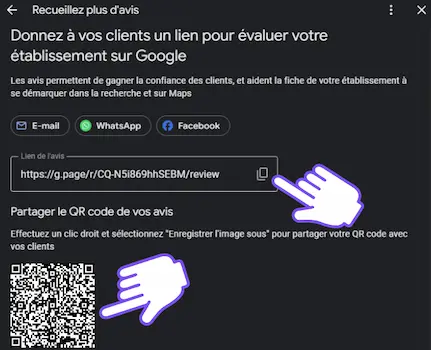
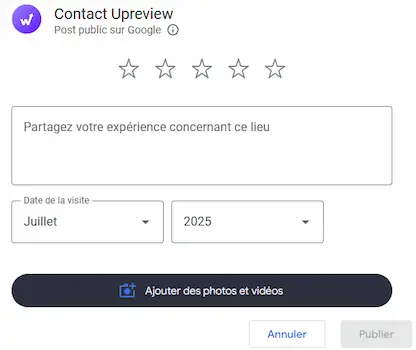
When a customer scans the QR code or opens the link, they're automatically redirected to the Google review-writing page.
Tip: also add it as a widget in your website's footer.
2. Create a Google Review Link on Mobile
Open your browser (like Google Chrome or Safari) on your Android or iOS smartphone.
In the Google search bar, type your business name. (If you're signed in to your Google account, a management listing appears automatically. This page is visible only to you.)
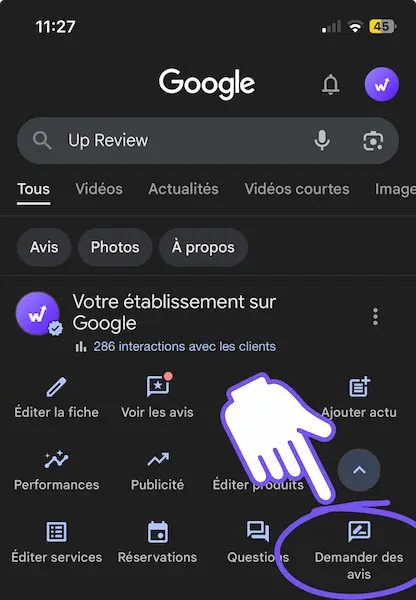
Tap the "Ask for reviews" button.
Depending on your device:
- On Android, tap "Copy link" to save it.
- On iPhone, you can share the link directly by email, SMS, AirDrop, or through apps like Snapchat.
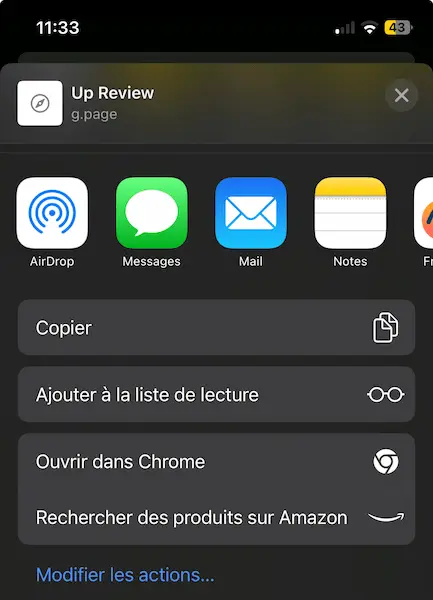
The customer will be redirected straight to the form where they can leave a review!
The 6 Best Methods to Share a Google Review Link
Creating a link is one thing. Sharing it effectively is another. Here are 6 proven methods for sharing your Google review link and maximising customer feedback.
| Method | How it works | Best for |
|---|---|---|
| Sent right after a purchase or service, with a direct clickable link | Post-purchase follow-ups and newsletters | |
| SMS | Text message with the link, open rate above 95% | Fast, high-visibility outreach |
| QR code | Displayed at the point of sale, customers scan to reach the review page | Counters, receipts, storefronts |
| Social media | Shared as a post, a Story sticker or a bio link | Community engagement and visibility |
| NFC plate | Customer taps their phone on the plate to open the review page instantly | Checkout counters and front desks |
| Prize game | Customers leave a review, then spin a wheel to win a gift | In-store engagement and loyalty (Up Review) |
1. Share the Link by Email (After a Purchase or Service)
Email is one of the highest-performing channels for collecting customer reviews, as long as you use it at the right moment.
The ideal strategy is to send a message right after a purchase, an order, receiving a service, or an eagerly awaited launch. (This is exactly when your customers are most receptive!)
A well-crafted message can make all the difference, especially if you want more Google reviews.
Use this moment to kindly ask for a review, in a simple, human and personalised message. Need inspiration for the wording itself? Our guide on how to encourage customers to leave a review has message templates that convert well.

👉 Add a clickable button or hyperlink in the email body, and don't forget to include this link in your marketing campaigns and automated newsletters. A single emailing plugin is all it takes!
2. Send the Link by SMS (Very High Read Rate)
With an open rate above 95%, SMS outperforms email and remains a go-to mobile marketing channel for engaging your customers and prospects.
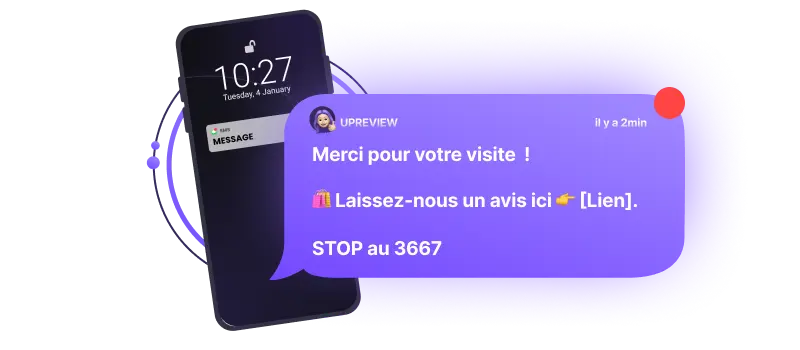
Keep the message short and clear. Send it a few minutes or hours after the experience to maximise your chances of a response, while the customer still remembers you!
Tip: turn on follow-up notifications to trigger sending automatically.
3. Display a QR Code at the Point of Sale (The Best-Known Method)
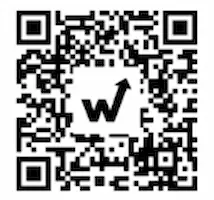
The QR code is one of the most accessible ways to collect reviews in-store or at any physical location.
Customers simply scan it with their smartphone to go straight to your Google review-writing page.
Effective placement ideas:
- On the counter
- At the exit
- On the storefront window
- On a receipt, a flyer or a poster
Scanning triggers the link, the rating and the comment: zero typing, zero friction!
Tip: add a clear call to action right next to the visual: "Scan me to leave a review!"
👉 [Use the free Up Review QR code generator for your Google review link]
4. Post Your Link on Social Media (The Most Visible Method)
Social media is a great showcase for asking customers for reviews while strengthening your community.
Here are a few simple ideas to put in place:
- Publish a thank-you post after an order or an event, with the link to leave a review.
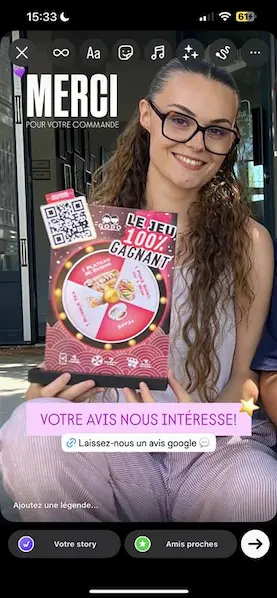
- Add the link as a sticker in your Instagram Story or in your bio.
- Turn on the "Reviews" button on your professional Facebook page.
The key is to stay natural, without forcing it. A human, authentic message makes all the difference.
Example of an Instagram Story sharing a Google review link:
5. Use an NFC Plate for Your Google Review Link (The Fastest Method)
For an even smoother experience, consider using an NFC plate or a connected card. It's the fastest way to share a Google review link, no QR code scanning or URL typing required.
How does it work?
- The customer holds their smartphone near the NFC plate or card (placed on a counter or fixed at the checkout).
- A notification automatically pops up on screen and sends them to the "Write a Google Review" page.
- They can leave their review in a single tap, with zero friction.
Bonus: some NFC plates let you add your logo, a visual or a personalised message to encourage happy customers to write a positive review.
👉 [Order your NFC plate directly from the Up Review shop]
6. Collect In-Store Reviews with a Prize Game and a Google Review Link (The Most Effective Method)
If you have a physical point of sale, the fastest and most engaging method is still the prize game that boosts Google reviews: this is exactly Up Review's expertise!
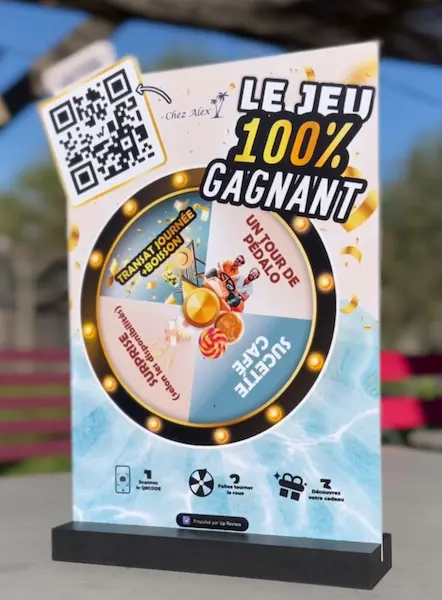
So how does it actually work?
- A QR code is displayed on a visual medium (poster, kiosk, flyer...).
- The customer scans it after their purchase or during their visit.
- They leave a Google review on your business listing.
- They then try their luck on the spin-to-win wheel (or a scratch card) to win a gift.
- You collect their contact details for your next SMS marketing campaigns, you get a Google review, and you build loyalty with a happy customer who'll come back to use their gift.
The result for you?
- More positive Google reviews
- A better average rating
- A better customer experience
- A richer customer database (email, phone)
- Stronger word of mouth
With this fun method, you turn a simple review request into a memorable experience. And best of all, you automate the whole process with no effort!
Conclusion: Make the Most of Your Google Review Link with Up Review
Today there are many ways to create and share a Google review link.
But the real difference lies in how you share it, at the right time and in the right place.
With Up Review, you can go even further:
- Run in-store prize games to engage your customers and get them playing right away.
- Offer instant access with an NFC plate or card.
- Create a custom QR code directly from the app.
- Centralise and manage all your campaigns from a single, intuitive interface.
By combining these methods with an optimised strategy, you can quickly get more 5-star Google reviews and durably improve your online visibility.