
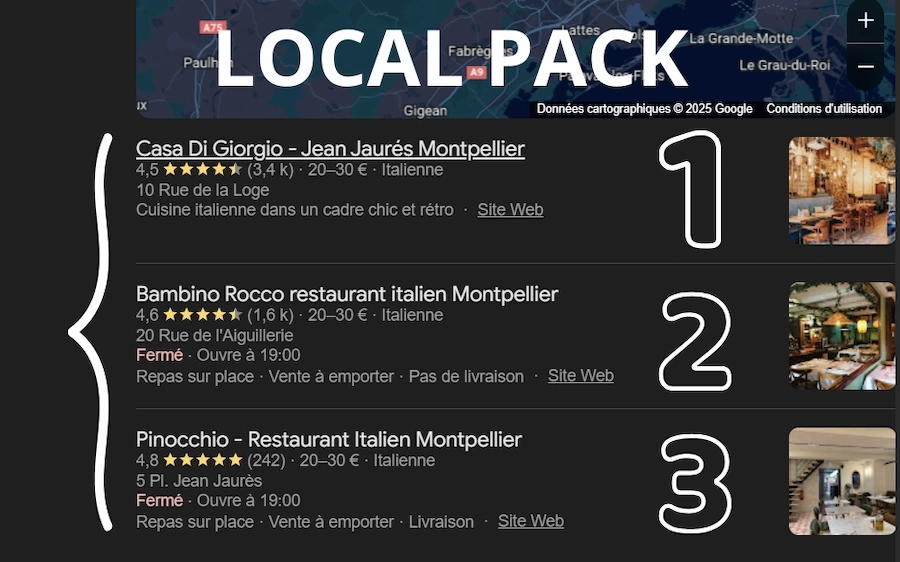
Local SEO for restaurants is the work that puts your restaurant in Google's map pack when someone nearby searches "italian restaurant", "brunch near me" or "best tacos open now". Google ranks those results on relevance, distance and prominence, and the only one of the three you can move in weeks is prominence, which includes your review count and ratings. The seven levers below cover the rest.
The context is not forgiving. The National Restaurant Association projects $1.55 trillion in US restaurant sales for 2026, but 60% of operators reported softer traffic last year and 42% were not profitable. Diners decide before they walk in: in the BrightLocal 2026 survey, 97% read reviews and 68% require four stars or more.
What Google actually says about local ranking
Google's own help page lists three factors and no others:
- Relevance: "how well a Business Profile matches what someone is searching for". Complete, detailed business information helps Google match you.
- Distance: "how far each business is from the customer who's searching". You cannot change it.
- Prominence: "how well-known a business is". Google adds that it also considers links from other websites and "review count and ratings".
Google also states there is no way to request or pay for a better local ranking. Everything below is about relevance and prominence.
Lever 1: a Google Business Profile that is complete and specific
Your profile is the ranking object. Fill every field Google offers, and get these right:
- Name: your real name, as on the sign. No "Best Italian Restaurant Downtown". Keyword stuffing violates the guidelines and can suspend the profile.
- Categories: Google's guidelines say to choose categories that describe what the business is, as specific as possible, as few as possible. "Pizza Restaurant" and "Pizza Delivery" if that is what you are; not "Restaurant" plus six attributes. You get one primary category and up to nine more.
- Hours: main hours, special hours for holidays, and "more hours" for delivery or brunch if they differ.
- Attributes: outdoor seating, reservations, takeout, delivery, wheelchair access, dietary options. They feed relevance for searches like "restaurant with patio".
- Menu: link to a menu page on your site, or use Google's menu feature. Google needs to read the dishes, not a photo of a chalkboard.
- Action links: reservation, order, menu. Fewer clicks means more bookings.
Our 15-step guide to optimizing a Google Business Profile walks through each field, and the free Google Business Profile audit scores yours in a minute.
Lever 2: reviews, the factor you control
Google names "review count and ratings" inside prominence, and tells businesses that replying to reviews "shows that you value their feedback". Diners agree: 80% are likely to use a business that answers all its reviews, and 42% are unlikely to use one that never replies (BrightLocal, 2026).
What moves the needle for a restaurant:
- Volume and freshness. A restaurant that receives five reviews a week looks alive; one with 900 reviews and nothing since last spring does not.
- Rating above the diner's threshold. 68% require four stars; 31% now require 4.5, up from 17% in 2025.
- Replies within 48 hours, in a human tone, mentioning the dish or the service when it fits.
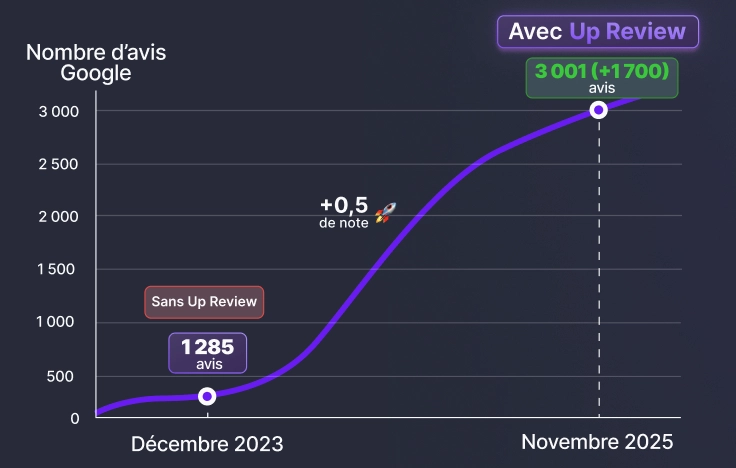
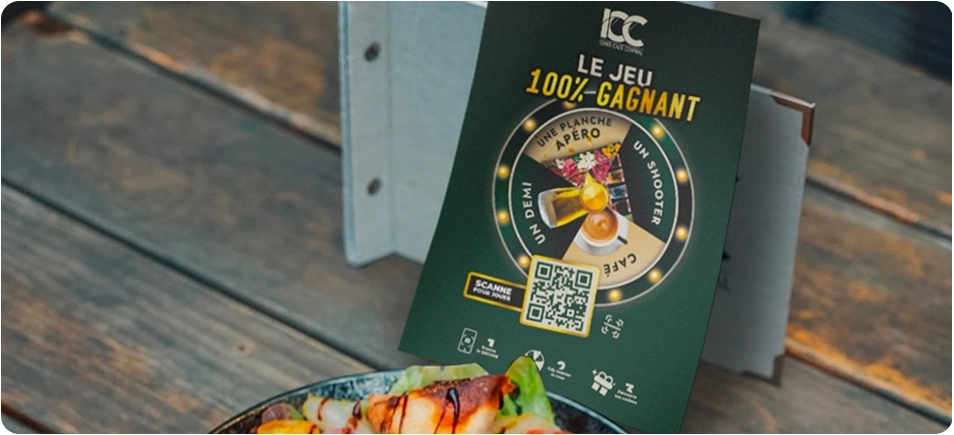
The weekly routine: ask at the end of the meal, when the customer is happiest. A QR code on the check holder, an NFC plate at the host stand, or a review contest where the guest leaves a review and spins a prize wheel open to everyone, whatever they write. Japan Burger collected more than 250 new Google reviews in one month this way, and its rating went from 4.4 to 4.7. Up Review restaurants with the contest collect around 200 additional reviews per month on average.
Two things to never do: buying or incentivizing positive reviews is prohibited by the FTC consumer reviews rule in the US and by Schedule 20 of the DMCC Act 2024 in the UK; and asking only happy customers (review gating) breaks Google's policy. Ask everyone, reward participation, not the rating. Our restaurant Google reviews guide details the scripts and timing.
Lever 3: a website Google can read in two seconds
The profile ranks; the website confirms. What matters for a restaurant site:
- Speed on mobile, since most local searches happen on a phone. Compress photos, avoid heavy scripts.
- A real menu page in HTML with dish names and prices. PDFs and images are invisible to search.
- One page per location for groups, with its own address, hours and reviews.
- Restaurant structured data (schema.org Restaurant with address, hours, cuisine, price range) so Google reads the facts without guessing.
- Contact and directions visible without scrolling, with an embedded map.
- Title and description that name the cuisine and the neighborhood: "Oaxacan restaurant in Logan Square" beats "Home".
You do not need a blog. You need a fast page that says what you serve, where, and how to book.
Lever 4: Yelp and Apple Business Connect
Most restaurants stop at Google. Two platforms decide a large share of US and UK restaurant searches:
- Yelp. Yelp for Business lets you claim a free page, update your information, reply to reviews and add photos. Paid ads and page upgrades exist, but the free page is what you need for consistency and replies.
- Apple Business Connect. On business.apple.com you "claim your location on Maps" and "control how your business appears with your logo, hours, images, and key details", including actions such as reservations. This is what iPhone users see in Apple Maps and what Siri reads. Apple's page lists no fee for it.
Add Bing Places (a few minutes, imports from Google), Tripadvisor for tourist areas, and OpenTable or Resy if you take reservations through them. Each one adds something different in the US and the UK.
Lever 5: the same name, address and phone everywhere
Google cross-checks your profile against the rest of the web. One listing with a different suite number, an old phone number or "St." versus "Street" creates doubt. Pick one exact format and apply it to Google, Yelp, Apple, Bing, Tripadvisor, delivery apps, social profiles and your website footer. For groups, do the audit location by location once a quarter.
Lever 6: photos of the food, the room and the people
Google tells businesses that photos and videos let you "show customers what you offer and tell the story of your business". For a restaurant that means dishes shot in daylight, the dining room at service, the terrace, the team. Add new ones every month; a profile whose last photo is two years old reads as closed. Encourage guests to post theirs: user photos appear on your profile and signal activity.
Lever 7: measure monthly, adjust quarterly
Your Business Profile reports calls, direction requests, website clicks and menu views. Search Console shows which queries bring people to your site. Track four numbers each month:
- Calls and direction requests from the profile.
- New reviews and average rating.
- Share of reviews answered.
- Map pack presence for your five core searches ("[cuisine] restaurant [neighborhood]", "brunch near me" from your area, and so on).
If calls drop, check in this order: a profile edit pending or rejected, a competitor that opened nearby, review flow that stopped, a listing inconsistency. Our guide on how to rank higher on Google Maps gives the monthly checklist, and the Up Review Google Business Profile module tracks your position on a grid of 3, 9 and 22 km around the restaurant.
For groups and franchises
Each location needs its own profile, its own page, its own reviews and its own replies. Centralize the standards (categories, photo style, reply tone, review routine) and decentralize the execution. A store locator on the website, with one page per restaurant and consistent data, helps Google map the network. Our restaurant page shows how Up Review runs reviews, replies and customer data across several locations from one dashboard.
Where Up Review fits
Up Review does not build your website or manage your listings. It works the lever you can move fastest: reviews. The in-store contest, the QR code and the NFC plate collect reviews at the table, the AI drafts replies you approve, every participant joins your customer base for SMS campaigns, and the dashboard shows the rating and review volume per location. Plans start at 89 EUR per month excl. VAT with a 12-month commitment, billed in euros; see the pricing and ask about SMS coverage for your country during the demo.
The 90-day plan
- Weeks 1 to 2: complete the Google Business Profile (categories, hours, attributes, menu link, 20 photos), claim Yelp and Apple Business Connect, fix the name-address-phone format everywhere.
- Weeks 3 to 6: start the review routine (ask every table, reply within 48 hours), publish the HTML menu page, add Restaurant structured data.
- Weeks 7 to 12: keep the review flow, add monthly photos, measure calls and direction requests, adjust categories or attributes based on the searches that bring traffic.
A restaurant that runs these seven levers for 90 days generally sees its map pack presence and its direction requests move before any ad spend. Reviews come first because they are the only factor that moves on your schedule.
Get more Google reviews from every table
Book a 30-minute demo: we open your restaurant's profile, show the review contest and the AI replies, and give you the price for your locations.