![How to ask for a Google review: message examples [2026]](/images/blog/cover-demander-avis-google-meilleures-astuces.webp)
Not sure how to ask your customers for a Google review, or too nervous to bring it up at all?
It is the most common hesitation out there, and it is a costly one: a Harvard Business School study found that one extra star in your ratings can lift short-term sales by 5 to 9%.
The good news is that asking for a review really comes down to two things: the right timing and the right words.
👉 In this article: when to ask, how to ask depending on the channel, and ready-to-copy message templates for SMS, email, in person, and QR codes.
This article focuses on the wording. For the bigger-picture strategy, check out our ultimate guide to getting Google reviews.
When to ask for a Google review
Timing matters just as much as wording. Three windows work well:
Right after the experience, while it is still fresh: at the end of a meal, at checkout, right after a job well done. Satisfaction is at its peak, and customers say yes easily.
24 to 48 hours later, for products and services where the benefit only becomes clear with a bit of hindsight: delivery, repairs, at-home services.
After resolving a problem: a customer whose issue was handled well is often one of the most willing to leave a review.
On the other hand, avoid asking for a review after a long wait or an unresolved hiccup. In that case, a sincere apology beats forcing a review that was never going to happen.
One rule applies everywhere: one call to action at a time. Ask for either a Google review or a product review, never both in the same message.
How to ask: the 4 channels that work
1. In person, face to face

The simplest method is often still the most effective one. Plenty of customers do not even realise they can leave a review on your Google page.
👉 In fact, BrightLocal found that 77% of customers leave a review when asked directly.
An in-person request works even better coming from the person who actually served the customer: a sales assistant, a server, a practitioner. Train your team to spot happy customers and slip the request naturally into the end of the conversation, with no pressure attached.
2. By SMS, right after the visit
SMS has the highest read rates of any channel, which makes it perfect for asking while the experience is still fresh: the customer gets the message a few minutes or hours after their visit, with a direct link attached.
Two things matter most: keep the message short (two sentences is plenty) and use a single link that leads straight to the review form, with no extra steps in between.
3. By email, 1 to 3 days later
Email gives you more room to personalise: a reminder of the visit date, a mention of the specific product or service. It works well for larger volumes and for customers whose email address you already have.
The subject line and the opening sentence do all the heavy lifting: that is what decides whether the email gets opened at all.
4. By QR code or NFC plate, on site
In store, a QR code on the counter, the table, or the receipt captures the review while the experience is still fresh. An NFC plate for Google reviews takes it even further: just a tap of the phone does the trick.
👉 Either way, make life easy for your customers with a personalised link that takes them straight to your Google review form. Check out our guide to creating your Google review link in 5 minutes.
Ready-to-use message templates
Here are examples you can copy and adapt. Adjust the tone if your relationship with customers is more casual.
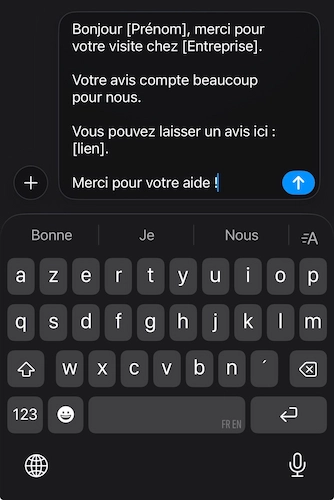
SMS templates
Template 1 (short and direct):
"Hi [Name], thanks for stopping by [Business]! If you had a great time, we'd really appreciate a quick review: [link]. Thanks so much!"
Template 2 (post-visit):
"Hi [Name], thank you for visiting [Business]. Your feedback means a lot to us. Leave a review here: [link]. We really appreciate it!"
Template 3 (aimed at future customers):
"Hi [Name], thanks for choosing us. Mind sharing your experience? It takes less than a minute and helps other customers decide: [link]"
Email templates
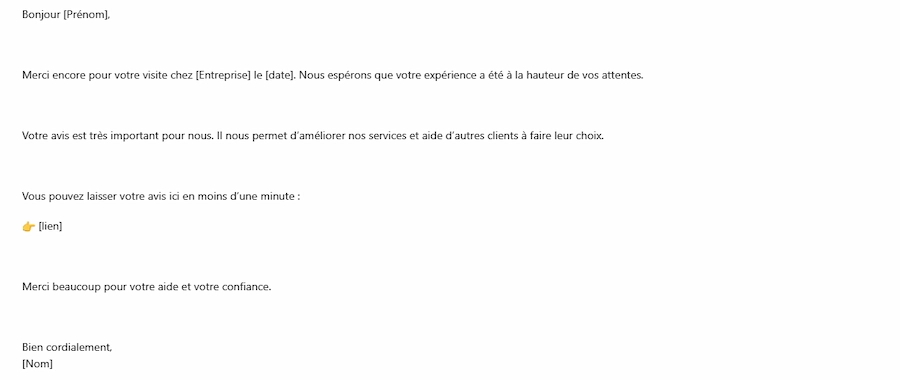
Email template 1: professional and personalised (1 day later)
Subject: [Name], we would love your feedback
Hi [Name],
Thanks again for visiting [Business] on [date]. We hope everything met your expectations.
Your feedback matters a lot to us. It helps us improve our service and helps other customers make up their mind.
You can leave your review here in under a minute:
👉 [link]
Thank you so much for your time and for trusting us.
Best regards, [Name]
[Business]
Email template 2: warmer and experience-focused
Subject: Got a minute to share your experience with [Business]?
Hi [Name],
Following your recent visit to [Business], we'd love to hear what you thought.
Your feedback helps us improve our service and helps other customers feel confident choosing us.
Just click here to leave your review:
👉 [link]
It only takes a minute. Thanks for your time.
Talk soon,
[Name]
[Business]
In-person templates (at point of sale)
Template 1:
"Did you enjoy your experience? Feel free to share it on Google, it really helps us out. I can even text you the link right now if you'd like."
Template 2:
"If you have a minute, your review would really help us improve our service. You can scan this QR code, or use the link we'll send you."
Template 3:
"Your feedback matters a lot to us. If you have a minute, you can leave a review by scanning this QR code. It genuinely helps us keep improving."
Templates for posters or QR codes
Template 1:
Your review helps us improve our service. Scan this QR code to leave a review in 1 minute. Thanks for your help.
Template 2:
Enjoyed your experience? Scan this QR code to share your review. It helps future customers make the right choice. Thank you so much.
The 3 ingredients of a request that converts
Whatever the channel, a good review request comes down to three things:
Say thank you, genuinely: gratitude first, the request second.
Name the platform clearly: say "a Google review", not just "a review", to avoid any confusion.
Give a single link: the customer should not have to search for anything.
Also avoid any wording that implies you are only after positive reviews. What you are asking for is an honest review: that is what makes your online reputation credible, and it is also what Google's rules require.
Wondering whether you can offer a gift or run a prize game to encourage reviews? Rewards, gamification, and the legal framework are all covered in our guide on motivating customers to leave a review.
Then reply to every review you get
Google favours businesses that actively manage their online reputation. Replying to reviews (positive and negative alike) encourages other customers to share their own experience.
A Pew Research study found that 40% of consumers change their opinion of a business after reading its reply to a review.
Best practices:
Thank customers for positive reviews
Handle criticism professionally
Personalise every reply to comments
👉 Automate your replies to Google reviews
Asking for Google reviews: start today
You now have the timing, the channel, and the words. Start simple: an in-person request at the end of the interaction, backed up by an SMS with a direct link, and you will see your first results within a few weeks.
And to scale the process without spending your whole day on it: asking for reviews fits into a complete collection process, laid out in our 6-step method to collect more customer reviews. Up Review automates the whole thing end to end, from the post-visit SMS to the in-store prize game.