

Choosing from the Google Business Profile categories list sounds like a two-minute job. It isn't. Google gives you roughly 4,000 labels, and the one you pick as primary tells Google what your business is. BrightLocal puts the number at "around 4000 GBP categories, though these change all the time" (BrightLocal).
Pick the most specific primary category that describes your core business, then add secondary categories only for services you really offer. This guide shows example categories by industry, a simple method to choose, and what to check after you save.
What Google Business Profile categories are
A category is a label that tells Google what kind of business you run. Google is clear about the rule: "You can't create your own category" (Google Business Profile Help). So the word you use for your trade may not exist. A pizza maker looks for "Pizza restaurant", not "pizzaiolo".
There are two kinds. The primary category is the one that best describes your business. Secondary categories cover other things you do. Whitespark and BrightLocal both state the limit: one primary and up to nine secondary categories (Whitespark).
Why the primary category matters for ranking
Google says local results are ranked on relevance, distance and prominence, and describes relevance as "how well a Business Profile matches what someone is searching for" (Google Business Profile Help). That page does not name categories. Linking the two is our inference, and it is a safe one: a label that describes your business is the obvious way to say what you are.
Practitioners agree. Whitespark's 2026 Local Search Ranking Factors, published in November 2025, ranks the primary GBP category first for local pack and maps results, with a score of 227. Additional categories rank eighth, with 173 (Whitespark).
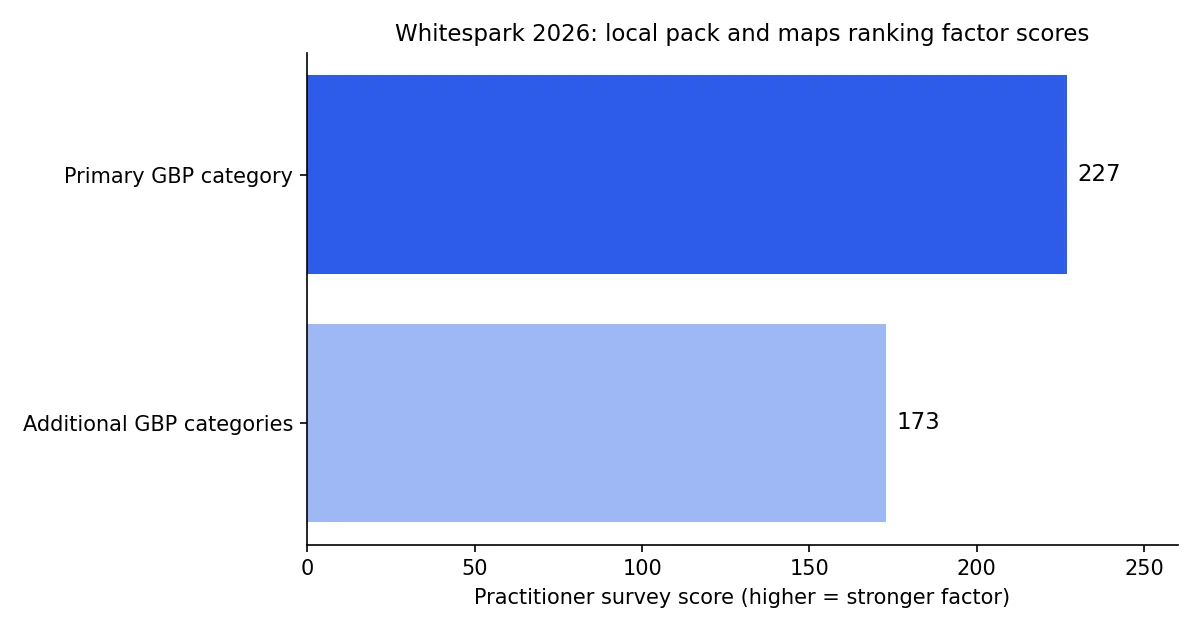
One caution. These are survey scores from local SEO professionals. Google has never published a weighting, and Whitespark sells local SEO services, so read the figures as expert opinion. The direction is clear, though. Get the primary category right first.
Google Business Profile categories list by industry
Google's full list sits behind your dashboard, and the API version needs authentication (Google My Business API). The examples below are common labels from public category lists. Type each one into your profile to confirm the exact current wording before you rely on it.
| Industry | Example categories |
|---|---|
| Restaurants and bars | Italian restaurant, Sushi restaurant, Pizza restaurant, Bar, Cocktail bar |
| Home services | Plumber, Electrician, Roofing contractor, Heating contractor, HVAC contractor |
| Health | Dentist, Dental clinic, Chiropractor, Optometrist |
| Beauty | Beauty salon, Nail salon, Barber shop |
| Retail | Clothing store, Pet store, Hardware store, Department store |
| Automotive | Car dealer, Auto repair shop, Car wash |
| Professional services | Accountant, Lawyer, Divorce attorney, Real estate agency |
Notice how specific they get. "Divorce attorney" sits next to "Lawyer". "Nail salon" sits next to "Beauty salon". That is why guessing the label fails: the best match is often one level more precise than the word you first think of.
This table is a sample, not the full catalogue. For a label matched to your trade, our free Google Business category finder takes your trade in plain words and suggests a primary category and secondary ones.
How to choose your primary category in 5 steps
- Write down what you sell. List your services and mark which one brings in most of your revenue.
- Search your dashboard. Type your main service into the category field and read every suggestion, not only the first.
- Choose the most specific match. Google's example: "Nail salon" rather than "Salon" (Google Business Profile Help).
- Look at who ranks above you. Search your main keyword on Google Maps. Open two or three profiles that rank well and note their primary category. Copy the idea, not blindly the label, since your business may differ.
- Save it once. Don't rotate categories to test. Each change can trigger a check.
If you do several things, pick the one that pays the bills. A restaurant with a bar can choose "Restaurant" as primary and add "Bar" as secondary. A multi-trade contractor should lead with the work that brings in the most jobs.
How many secondary categories to add
Google's advice is to "choose the fewest number of categories it takes to describe your overall core business" (Google Business Profile Help). The nine slots are a limit, not a to-do list. Our category finder suggests three secondary categories as a starting point, and you can adjust from there.
A practical rule: add a secondary category only if you would be happy to get a phone call about it tomorrow. A dentist who offers cosmetic work can add a cosmetic dentist label. A dentist who has never done it should not.
Whitespark ranks additional categories eighth among local pack factors, which is a real signal (Whitespark). But categories that don't match what you do put your profile at risk, because Google expects them to describe your real business. If that has already happened, our guide on what to do when a Google Business Profile is suspended walks through the steps.
What to do when you change a category
Google warns that when you add or edit a category you may be "asked to verify your business again" (Google Business Profile Help). So plan the change:
- Check that your name, address and phone number are correct before you edit.
- Change the category on a quiet day, not before a busy weekend.
- Note your Maps position for two or three key searches, then look again after a few weeks.
- Keep every other field steady for that period, so you know what caused any move.
The list also moves. If Google renames or retires a label, your profile may show a different category than you remember. A quick look every quarter is enough.
Special cases
Service-area businesses. Plumbers, cleaners and mobile mechanics follow the same method. One specific primary category, then secondary ones for real services. For the other profile fields that matter alongside categories, see our Google Business Profile optimization guide.
Multi-location businesses. Keep the same primary category for the same type of site, unless a location really works differently. A shop that also runs a cafe in one branch can add the cafe category for that branch only.
Seasonal businesses. BrightLocal suggests thinking about seasonality when you choose secondary categories. Add a seasonal label only while you really offer it, and review it at the start of each season.
Categories are the start, reviews keep you visible
A precise category tells Google when to show you. Reviews tell people whether to choose you. Both sit on the same profile, so improving one without the other plateaus fast.
Up Review's Google review management helps you collect more reviews with a QR code and an NFC plate. You can also run our free Google Business Profile audit to see how your listing scores today. If you also want to understand the wider picture, our guide to local SEO for restaurants shows how categories fit with the other ranking factors.