
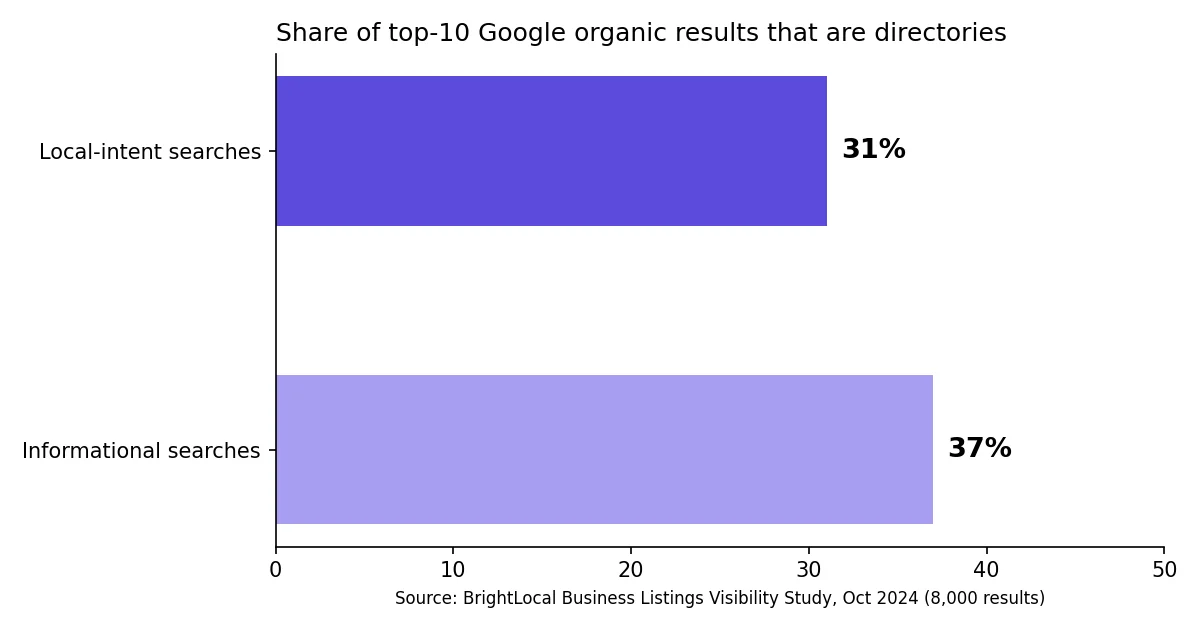
Directories still show up where your customers look. BrightLocal's October 2024 study found that directories make up 31% of the top 10 organic results for local-intent searches on Google (BrightLocal). Yelp alone accounts for 28% of those directory results. If your business is missing from them, someone else owns that space.
Claim Google, Apple Business, Bing Places, Yelp, Nextdoor and a Better Business Bureau profile first. All are free, and every listing should use one identical NAP sheet (name, address, phone). This guide shows what each directory needs and which extras are worth your time.
What a citation is, and why free directories still matter
A citation is any online mention of your business name, address and phone number. Most of them live in directories. Search engines compare those mentions to check that your business is real and where you say it is.
Google says that "businesses with complete and accurate info are more likely to show up in local search results" (Google Business Profile Help). That is the whole logic of citation building. Accurate details, repeated in the right places.
There is also a newer reason. Whitespark's 2026 Local Search Ranking Factors report puts it this way: "In AI SEO, mentions (citations) are the new link" (Whitespark). AI assistants pull from the same web of listings and reviews. And more people ask them: BrightLocal's 2026 survey found that generative AI use for local recommendations rose from 6% to 45% in one year (BrightLocal).
One caution. BrightLocal and Whitespark both sell citation services, so read their figures as vendor research. The direction is consistent across sources, though: accurate listings help, and sloppy ones hurt.
Step zero: build your NAP sheet
Before you claim anything, write down your details once. Then paste them everywhere. This is the cheapest way to avoid duplicates and mismatches.
| Field | What to write | Common mistake |
|---|---|---|
| Business name | Your real, public name, as on your sign | Adding keywords ("Joe's Pizza Best Pizza Austin") |
| Address | Street, suite, city, state, ZIP, in one fixed format | "Suite" in one place, "Ste." in another |
| Phone | One local number, same format everywhere | A tracking number on some listings, the real one on others |
| Website | One URL, with or without www, always the same | Mixing http and https |
| Hours | Regular hours plus holidays | Hours updated on Google only |
| Category | The closest category the platform offers | Picking a vague, generic one |
| Description | One short paragraph, plain facts | Pasting a 500-word sales pitch |
Keep this table in a shared document. When something changes, such as a move or a new number, update the sheet first and then every listing.
The six free listings to claim first
These are the ones with an official page describing a free listing. Do them in this order.
1. Google Business Profile
This is the one that feeds Google Search and Google Maps. Google states: "You can add or claim your business at no charge" (Google Business Profile Help). You need an eligible business, an accurate address and a verification step. If you have not created yours yet, follow our guide to creating your Google Business Profile, then optimize it.
2. Apple Business (formerly Apple Business Connect)
This is where many older guides are wrong. In March 2026 Apple announced Apple Business, "available as a free service" from April 14, 2026, and said Business Connect would no longer be available, with its data migrating to the new platform (Apple Newsroom). Claim your location on Apple Maps first, then sign in with an Apple Account. Paid Maps ads are a separate product, and you do not need them to be listed.
3. Bing Places for Business
Microsoft describes Bing Places as a free online platform (Bing Blogs). You create an account at Bing Places. There is an option to import an existing Google Business Profile, which saves typing. After an import, check every field. Imports copy mistakes as faithfully as they copy facts.
4. Yelp for Business
Yelp lets you manage your page for free. Search for your business on Yelp for Business and claim the existing page rather than creating a new one. Yelp Ads are the paid layer and are optional. Yelp matters beyond Yelp itself, since it supplies a large share of directory results in search.
5. Nextdoor Business Page
A Nextdoor Business Page is free (Nextdoor). Claim it as an owner or authorized representative. Some home-based or casual services need extra documents. It is especially useful for service businesses that rely on neighborhood word of mouth.
6. Better Business Bureau profile
A basic BBB profile is free to request at BBB Get Listed. Do not confuse it with BBB Accreditation, which is a paid annual membership. You can have the free profile without ever paying for accreditation.
Second tier: free basics, but read the fine print
These directories offer a basic listing, and their free and paid tiers change often. Read the sign-up screen before you enter a card number.
| Directory | Basic listing | What to watch |
|---|---|---|
| Foursquare | Check the sign-up page | You may need to verify ownership before the listing goes live |
| Manta | Basic listing | Paid plans may be offered after sign-up. Skip the upsell |
| Hotfrog | Free sign-up | Paid upgrades exist. Check that your category is supported |
| MapQuest | Basic listing | Some management options may be paid |
| Yellow Pages (YP.com) | Free listing option | Paid ad plans are often promoted |
| Data Axle and Neustar Localeze | Aggregators | Verification and fees vary. Check current terms |
If a directory asks for payment just to appear, treat it as an ad, not a citation. The only paid items worth considering are ones you would buy as advertising anyway.
Directories to skip or treat with care
- Old names. Some older lists still include sites that have closed or merged. Open the site first. If it does not load, drop it.
- Pay-to-list "chambers" and membership sites. A chamber of commerce listing can be useful, but check whether it is a membership fee before counting it as free.
- Social profiles. Instagram and LinkedIn are not business directories. Keep them up to date, but they do not replace claimed listings.
- Bulk submission offers. Anyone selling "500 listings" for a flat fee is selling volume, not accuracy. You cannot keep that many listings up to date.
Duplicates: find them and fix them
Duplicates split your reviews and confuse search engines. Once a month, search each major platform for your business name, your old name, your old address and your phone number.
When you find a duplicate:
- Claim the correct listing first.
- Use the platform's report or merge option for the extra one.
- Update any old address or phone number so the duplicate does not return.
- Write the fix in your NAP sheet so the next person does not undo it.
Whitespark ranks consistency of citations on primary search engines 28th among local pack and map ranking factors, and 31st for AI search. Consistency on data aggregators ranks 85th for the map pack (Whitespark). Those are rank positions in a survey of experts, not percentages. The takeaway: get the main platforms perfect before you worry about the long tail.
A 90-minute setup plan
- 15 minutes: build your NAP sheet.
- 30 minutes: claim or create Google, Apple Business and Bing Places.
- 20 minutes: claim Yelp, Nextdoor and your BBB profile.
- 15 minutes: add one or two second-tier directories that fit your industry.
- 10 minutes: search for duplicates and write down what you found.
Then put a reminder in your calendar for every quarter. Listings go stale quietly.
After listing: reviews are what keep it alive
A listing tells people you exist. Reviews tell them whether to come in. BrightLocal reports that 97% of consumers read online reviews, and 41% say they always do (BrightLocal). The same survey shows Google as a review source falling from 83% to 71% in a year, so your reviews on several platforms matter more now.
Ask every customer, not only the happy ones, and make it easy. A QR code at the counter and a direct link are enough to start. Our guides on requesting Google reviews and local SEO for restaurants (and the restaurant platforms list) show how. If you want to automate it, Up Review lets you collect reviews with a QR code, an NFC plate or a spin-the-wheel game, and manage and answer them with AI from one dashboard. You can see it in a 30-minute demo.
Quick video: NAP in local SEO