You probably already know that online reviews have become essential for your business. The more stars and recent reviews you have, the more you stand out in local search.
The catch? Your happy customers do not always think of it. Worse, asking them for a review can create an awkward moment!
What if we turned that request into an enjoyable moment instead? Imagine your customers, instead of facing a demand, playing a quick game for a chance to win a gift, while leaving you a Google review at the same time.
👉 In this article, discover why the prize game that boosts Google reviews is now the most effective method for collecting more reviews!
Why asking for a Google review is no longer enough?
The QR code: invisible, isolated and not engaging enough
You have probably seen these codes stuck on a counter or printed on the receipt with a message like "Leave us a Google review!". The problem? They have become so common that customers barely notice them anymore. Even your happiest customers do not always take the time to pull out their phone, scan the code, open Google and write a review... Too many steps, not enough motivation.
Asking in person: hard to get customers to actually leave a review
Asking for a review face to face, at the till or at the end of a service, can create an "awkward" moment. Your customer might feel almost obliged to say yes, but once they have left, they forget. In the end, you get plenty of promises but very few reviews actually published.
Email: low impact for getting real reviews
Sending an email a few days after the visit? It sounds like a good idea on paper, but in reality, the open rate is often low. And even if the customer opens the email, there is no guarantee they will take the time to click through and write a review.
The takeaway is clear: without real motivation or the right moment, your review requests get forgotten. That is where gamification comes in.
Gamification: THE fun, engaging method
1. What is gamification?
Marketing gamification simply means applying game elements in a context that is not inherently playful to begin with.
In practice, you borrow the mechanics that make games so compelling: points, challenges, progression, rewards, chance, instant feedback, and build them into the customer experience.
Instead of a cold, uninspiring request like: "Could you leave us a Google review?", you turn the moment into a positive interaction:
👉 "Scan the QR code and try your luck to win a prize by spinning our wheel!"
2. Boost your Google reviews with the carrot principle!

Want to know why this system works so well? It is simple: everybody loves a reward!
Our brain is wired to give in when we are promised a little something in exchange for an easy action. If a customer knows they can easily win something the moment you invite them to leave a Google review, they will go for it without hesitation.
This is what is known as the carrot: you offer something appealing (like a free dessert or a discount) to make people want to act. And guess what? You are probably already using this principle without even realising it:
"Buy one, get one free"
"Promo code for your first order"
"Free tasting in store"
These little tricks work because they speak to our desire to win something. It is simply a human reflex!
👉 And for your Google reviews, it is a secret weapon: customers write you a genuine comment while trying to win a gift, which boosts your local SEO. It is fun, fast and hugely effective!
3. Engage your customers: a game for EVERYONE
Young or old, everybody loves to play. A spinning wheel, a scratch card, a mini-game... These mechanics bring back happy memories and spark positive emotions. When your customers associate your business with a good time, they will naturally want to come back and recommend you.
In short:
The customer no longer feels like they are doing a chore, they are taking part in a game.
They get instant stimulation (a spinning wheel, suspense, animation).
They feel valued by a potential reward, even a modest one (a free dessert, a discount, a small gift).
The spin-to-win wheel: the star player for collecting (many) more reviews
How exactly does it work?
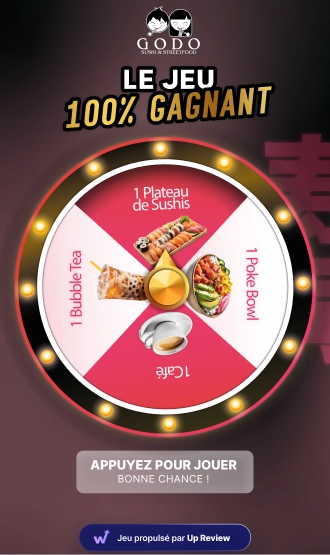
The spin-to-win wheel has become the star of Google review prize games. And for good reason: it is simple, visual, and creates real suspense.
Here is how it works, in 3 steps:
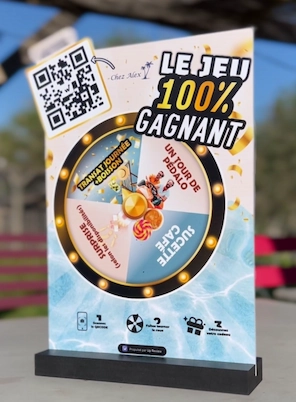
The customer scans a QR code: Placed on your counter, table or shop window, the QR code links to your game page.
They leave a review: Before spinning the wheel, the customer can leave a review on your Google profile. This step feels quick and natural, because it is part of the game.
They spin the wheel of fortune and discover their prize: Then the customer plays your game right on their smartphone. Suspense builds... and there it is, they find out what they have won: a free dessert, a discount, a free product...
Why does this win you 5-star Google reviews?
The "casino" effect: The spinning wheel creates suspense and instant excitement. Even when the prize is modest, the positive emotion is still there.
A guaranteed win: Unlike a prize draw, everyone walks away with something. This encourages participation and avoids disappointment.
Simplicity: No need to sign up or fill in long forms. The customer scans, plays, wins. It is quick and easy.
Expected results: 1 customer in 5 converted
On the ground, with good communication (posters, mentions from staff, a clearly visible QR code), you can expect at least 1 customer in 5 to leave a review. That is 20% of your customer base! And that is the minimum. With a solid strategy and appealing rewards, some businesses reach much higher rates.
Do the math: if you serve 50 customers a day, that could mean 10 new reviews a day, or 300 a month. Enough to genuinely boost your local visibility and attract new customers!
👉 Our client restaurant Trèfle Rouge, near Montpellier, went from 300 to more than 1,600 Google reviews in just 6 months using an Up Review spin-to-win wheel game!
How to set up a prize game?
Choosing the right moment
Timing is crucial. Offer the game at the moment your customer is happiest: right after their meal, at the end of a successful service, or at checkout. That is when they feel like thanking you, and when they are most receptive.
Communication materials
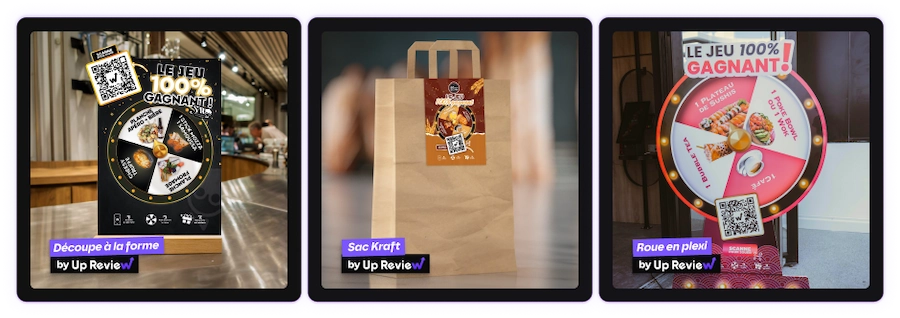
For your game to work, your customers need to see it! Multiply your touchpoints:
On the counter: A small poster with the QR code and a catchy message ("Try to win a free dessert!")
On the tables: A table stand or a sticker in plain sight
In the window: To catch attention right from the entrance
On the receipt: A short personalised note with the QR code
Do not forget: your team should mention it too! A simple "Feel free to scan our QR code for a chance to win a gift" can make all the difference.
Every game needs a real reward
The reward is at the heart of your game. It should be:
Appealing: Not too cheap (a mint sweet...), but not ruinously expensive either. A free coffee, a dessert, a 10% discount on the next visit, a product from your range...
Varied: On your wheel, include several reward tiers: small prizes (guaranteed for everyone) and a few rarer big prizes (to make people dream).
To be collected in store: That is the trick! Offer gifts to redeem on a future visit (with a purchase or minimum spend required). This builds loyalty and increases your sales.
The 4 mistakes you must absolutely avoid
1. Offering a reward that is too weak... or too GENEROUS
An uninteresting prize (a pen, a sweet...) will not motivate anyone. Your customers need to feel the game is worth their while. Think perceived value: a homemade dessert, a meaningful discount or an exclusive product will have far more impact than a generic gift.
⚠️ But be careful: too generous a reward can quickly work against you. Remember, it is a gift you are giving away! So make sure you set the winning odds carefully in your prize game. For example, do not set a 30% chance of winning a bottle of champagne...
2. Breaking Google review rules
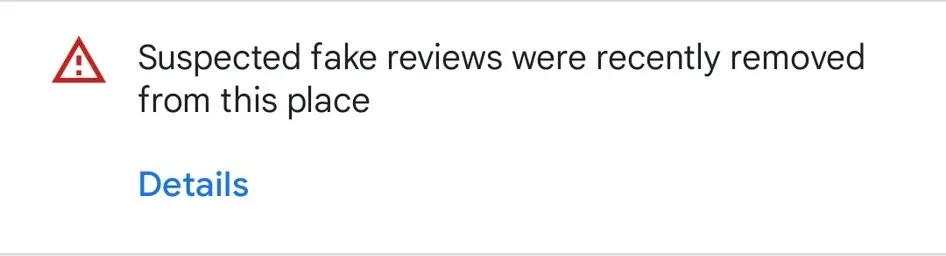
⚠️ Warning: Google strictly forbids rewarding a customer in exchange for a good review!
Never pressure customers into leaving a positive review. If Google detects manipulation, your reviews can be removed and your profile penalised. Stay transparent and neutral.
With Up Review prize games, there is no obligation to leave a review: after scanning the QR code, the customer is simply redirected to the Google Business Profile page of the business. They can then choose to leave a review (or not), and take part in the prize game either way.
In other words: no obligation, just a clear and positive incentive. The game becomes a motivating reward, without creating a "mandatory" exchange.
The customer stays free to express themselves, and it is legal, ethical and sustainable for your online reputation!
👉 Learn more about Google rules and penalties for review manipulation, buying fake reviews, and more.
3. Making the journey too complicated
Too many steps means customers give up. They should be able to scan, play and win in under 2 minutes. Do not ask for lengthy sign-ups, complicated forms or unnecessary information.
4. Skipping the follow-up means skipping loyalty
Launching your game is a great start. But keep an eye on your results! How many people scan? How many write a review? At what point do you lose participants? This customer data (collected in compliance with GDPR) will help you fine-tune your strategy and improve your performance.
Also think about follow-up reminders: a quick nudge by SMS or email ("Have not tried your luck yet?") can send your participation rate through the roof.
Beyond your Google rating: loyalty and repeat business
A gift to collect: a guaranteed return visit
One of the biggest advantages of the spin-to-win wheel is that the reward gives customers a reason to come back. A free dessert on their next visit, a discount to use within 30 days... You turn a simple game into a powerful customer loyalty tool.
Impact on average basket size
When a customer comes back to redeem their gift, they usually buy something extra too. In the end, your average basket size goes up. The cost of the gift is easily offset by this additional visit.
Creating a memorable experience
A customer who has fun is a customer who remembers. By offering a playful, positive moment, you build an emotional connection with your business. And that connection is exactly what makes people recommend you and happily come back.
Engage your customers and boost your visibility with Up Review
Convinced by the gamification approach but not sure where to start? Up Review offers an all-in-one solution to run a prize game and collect plenty of 5-star reviews!
What you get:
Prize games: spin-to-win wheel, scratch cards, slot machine and prize draws!
QR codes & visual materials provided: posters, stickers and table stands
Centralised Google reviews: track your rating, collect genuine reviews and reply automatically with AI.
SMS & email campaigns: follow up with your customers at the right moment and boost your conversions.
A fully featured dashboard: track your participants, reviews collected, conversion rate and customer feedback in real time.
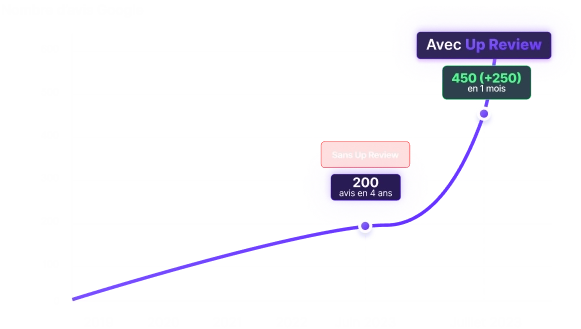
Our customers collect an average of 50 to 200 new Google reviews per month with our solution. Enough to durably boost your local visibility.
👉 The 8 best tools to boost your Google reviews in 2026
Conclusion: prize games for winning Google reviews
Gamification is perfect for getting Google reviews. Your customers play, win, and leave a review on Google. It is effective, and much simpler than traditional digital marketing!
Beyond the reviews, you build customer loyalty, climb the search results, and improve your online reputation.
So, ready to win more customers?
Forget the plain scratch card. It is time to launch your own customisable prize game. Watch your average rating take off, starting today!